
NHS England has launched a three year Quality Improvement (QI) programme designed to support ongoing improvements in NHS dental care. Participation is voluntary.
Eligible practices must complete a sign‑up eForm in Compass. NHSBSA is collecting this information on behalf of NHS England.
Visit the NHSE website for further information on the QI program.
Providers with more than one contract number
Where a provider holds more than one contract number in Compass, a separate eForm must be submitted for each contract.
Accessing the Quality Improvement sign-up form
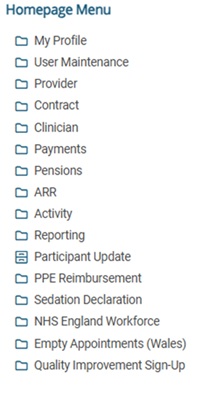
Select the Quality Improvement (QI) folder from the Homepage Menu.
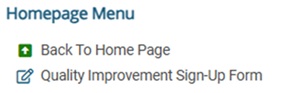
Select the Quality improvement Sign-Up Form option.
Creating the form
Step 1 – start a new form
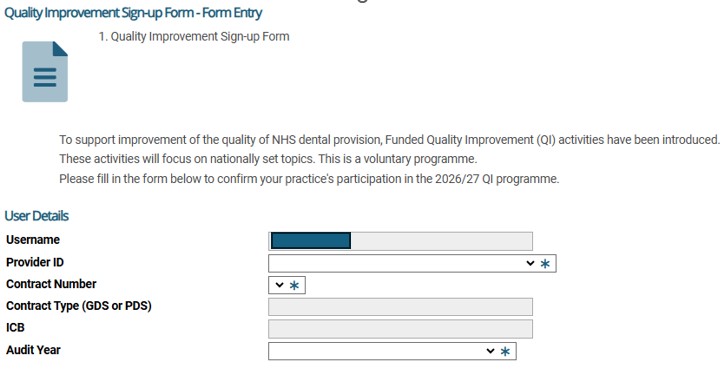
Once you’ve selected ‘NHSE Quality Improvement', you need to select the Start New Form button.

Note that any fields indicated with an asterisk (*) are compulsory.
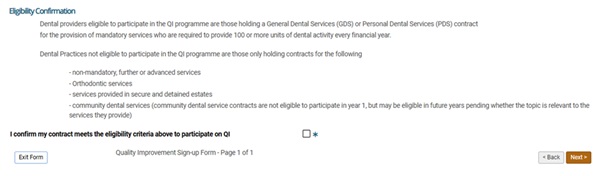
You must be eligible and tick the box ‘I confirm’ to be able to move to the next page
Step 2
Once completed, submit the form by selecting the Submit button on the summary page. Once submitted, the form cannot be amended. Duplicate submissions for the same contract number will not be accepted.
If at this stage the exit button is clicked rather than submit, the form will then appear as ‘Entered’ in the My Forms section – this can be completed at a later stage by selecting ‘Select’ in the Action column and completing the remaining steps as normal.
Entries for previously submitted forms can be viewed by following the same process on contracts with a status of Completed or Entered if you have not submitted the form.

Step 3
Accessing Your QI Data Pack
Practices that sign up will receive national QI data packs for 2026/27, provided by the NHSBSA Data Insight team. These will be available to eligible contractors through Compass.
How to download your QI Data Pack
- Log in to Compass
- From the Homepage Menu, select Reporting
- Select View Published Reports
- Enter EQIY1 in the Report Type field