
NHS England (NHSE) has introduced a funded appraisal scheme to support annual appraisals for clinicians providing NHS dental services.
Eligible clinicians must apply using an eForm in Compass. NHSBSA is administering this on behalf of NHS England.
Visit the NHSE website for further information on the Funded Appraisal program.
Claiming the Funded Appraisal Payment
Once your appraisal has been completed, you must submit your claim within 2 months of the appraisal date.
To sign-up to the funded appraisal eForm:
Log in to Compass (https://compass.nhsbsa.nhs.uk/auth/esr.elogin)
Select the Funded Appraisal folder from the Homepage Menu.
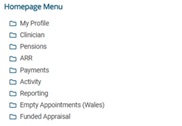
Next, select the Funded Appraisal Form option.

Creating the form
Start a new form
Once you’ve selected Funded Appraisal, choose the Start New Form button.

Note that any fields indicated with an asterisk (*) is compulsory.
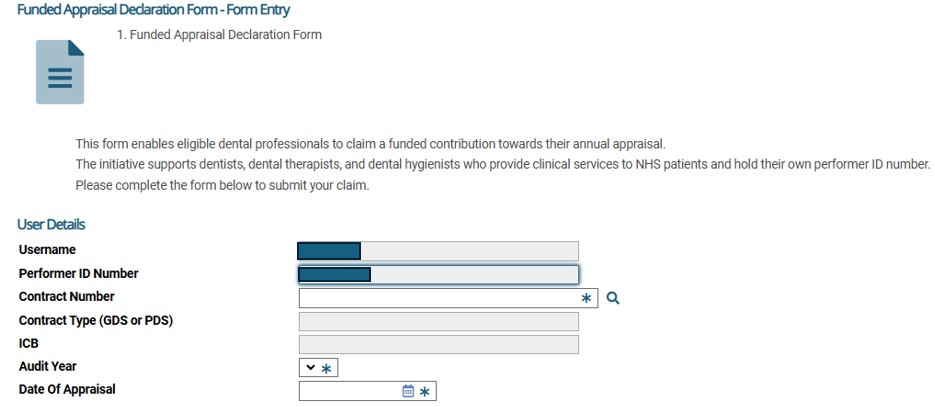
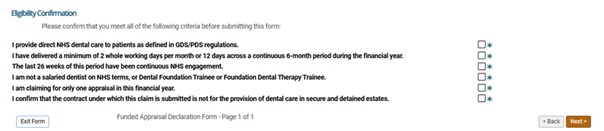
Ensure you meet the eligibility criteria by ticking each box.
Complete the Declaration by ticking the box and select the Submit button on the summary page. Once submitted, the form cannot be amended. Duplicate submissions will not be accepted.
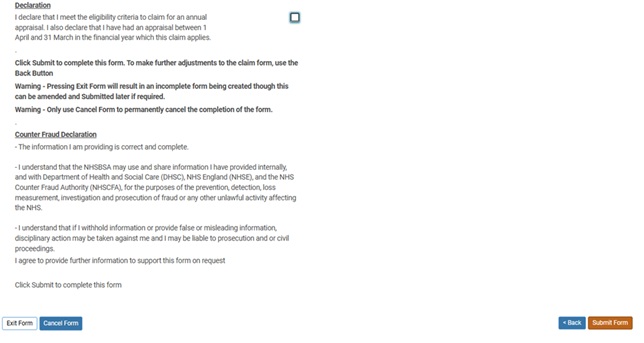
If at this stage the exit button is clicked rather than submit, the form will then appear as ‘Entered’ in the My Forms section. This can be completed at a later stage by selecting ‘Select’ in the Action column and completing the remaining steps as normal.
Entries for previously submitted forms can be viewed by following the same process on contracts with a status of Completed or Entered if you have not submitted the form.
